
Building a Document Management System (DMS) in SharePoint Online
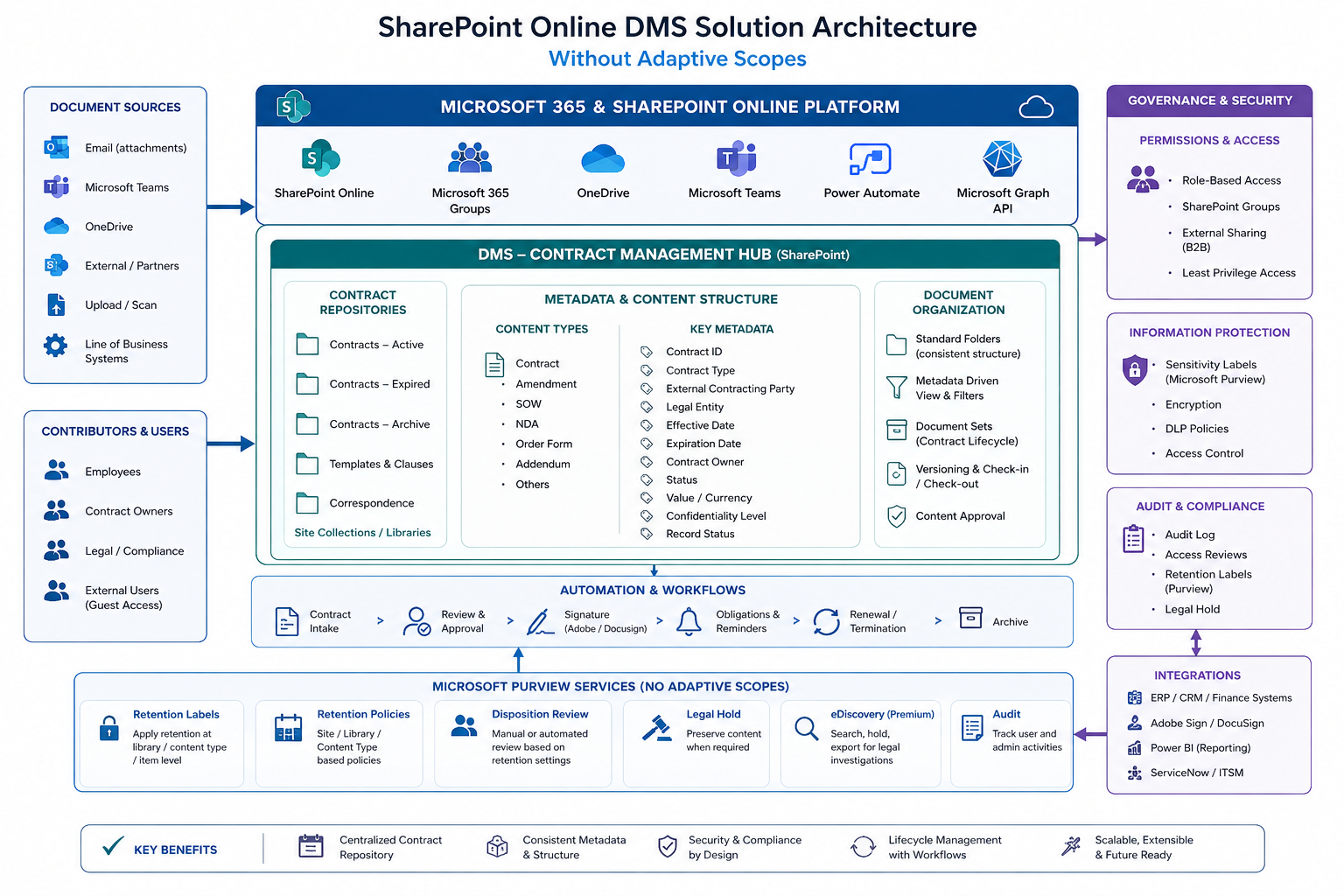
Environment: Microsoft 365 / SharePoint Online
Tenant: gulabprasad.onmicrosoft.com
Approach: Microsoft Graph + ExchangeOnlineManagement + SPO Management Shell + Purview (IPPSSession) + UI (PnP-free where mandated)
Table of Contents
- Overview
- Solution Architecture
- Why PnP-Free (and the One Exception)
- Prerequisites
- Fixed Identifiers
- Deployment Sequence
- Phase 1 – Site Columns
- Phase 2 – Term Store & Taxonomy Columns
- Phase 3 – Content Types
- Phase 4 – Binding Columns to Content Types
- Phase 5 – Document Set Configuration
- Phase 6 – Retention Labels & Policies
- Phase 7 – Search Schema Mapping (The Gate)
- Phase 8 – Validation
- Phase 9 – Production Cutover
- Phase 10 – Per-Site Onboarding Runbook
- Troubleshooting Log (Complete)
- Appendix A – Why PnP-Free (Summary)
1. Overview
This guide documents the end-to-end deployment of a Document Management System in SharePoint Online, built around the dossier principle: relevant documents must be archived inside a dossier (a Document Set) to be legally compliant, and retention begins when the dossier is closed.
The solution delivers:
- 28 site columns (22 standard + 6 managed-metadata/taxonomy)
- 6 content types — 3 document/email types and 3 dossier (Document Set) container types
- A Term Store taxonomy driving document classification
- Automated, KQL-driven retention using auto-apply retention labels
- Formal record declaration for legally-significant documents
2. Solution Architecture
2.1 The retention model
Retention is dossier-driven:
- A user files relevant documents inside a dossier (Document Set).
- Each document is classified with a Document Class (managed-metadata term).
- When work completes, the dossier owner closes the dossier (sets Dossier Status = Closed).
- The "Closed" status propagates automatically to every document inside via Document Set shared columns.
- An auto-apply retention label policy matches the closed, classified documents via KQL and applies the correct retention label — automatically, with no human interaction.
2.2 Why auto-apply labels, NOT adaptive scopes
This is the single most important architectural decision, and it is driven by the requirement for both legal compliance AND retention/governance.
The constraint: In Microsoft Purview, adaptive scopes and auto-apply retention labels are mutually exclusive — you cannot apply a label from an adaptive-scope retention policy. (Attempting it fails with Parameter set cannot be resolved.)
The decision: Legal compliance requires formal record declaration (immutable, formally declared records), which in Purview is provided only by retention labels (record labels), not by adaptive-scope retention. Since formal records are required, auto-apply labels are the necessary choice. The KQL that would have lived in an adaptive scope instead lives in each policy rule's -ContentMatchQuery.
| Adaptive scope + KQL | Auto-apply label + KQL (chosen) | |
|---|---|---|
| KQL location | Adaptive scope RawQuery | Rule ContentMatchQuery |
| Content targeting | Same KQL | Same KQL |
| Visible label | No | Yes |
| Formal record declaration | No | Yes (record labels) |
| Automation (no human labeling) | Yes | Yes |
Both approaches are equally automatic. The auto-apply-label approach additionally provides the formal records that legal compliance requires — which is why it was chosen.
3. Why PnP-Free (and the One Exception)
This deployment avoids the PnP.PowerShell shared multi-tenant app where production governance disallows it. Instead it uses first-party tooling:
- Microsoft Graph (
Invoke-MgGraphRequest) — columns and content types - ExchangeOnlineManagement (
Connect-IPPSSession) — retention labels and policies - SPO Management Shell (
Microsoft.Online.SharePoint.PowerShell) — site designs, tenant operations - The SharePoint admin UI — Term Store, Document Set configuration, search schema mapping
The one place PnP (or manual UI) is unavoidable
Document Sets feature activation. In SharePoint Online, the Document Sets feature cannot be activated via any API — not via site design (activateSPFeature), not via Enable-PnPFeature. Both fail with "Feature ... is not installed in this farm, and cannot be added to this scope." The only reliable methods are the UI (ManageFeatures.aspx) or, where an organization's own registered single-tenant app is approved, PnP with that app.
Note: "PnP-free" in this deployment means avoiding the deprecated shared PnP app. Using an organization's own registered app with the PnP module is a different risk profile and may be approved separately.
4. Prerequisites
- Roles: Global Administrator (or SharePoint + Compliance Administrator)
- PowerShell 7
- Modules:
ExchangeOnlineManagement,Microsoft.Graph,Microsoft.Online.SharePoint.PowerShell - App registration (for Graph app-only + optional PnP): e.g. "DMS-GP-Automation" with:
- Microsoft Graph → Sites.FullControl.All (Application, admin-consented)
- SharePoint → Sites.FullControl.All (Application, admin-consented) — separate grant from Graph; required for PnP tenant operations
- Content Type Hub provisioned:
https://gulabprasad.sharepoint.com/sites/contentTypeHub
Permission gotcha: GraphSites.FullControl.Alland SharePointSites.FullControl.Allare consented independently. An app can hold the Graph permission but not the SharePoint one; PnP tenant operations (Get-PnPTenantSite) require the SharePoint API permission specifically, or they fail withUnauthorized.
5. Fixed Identifiers
| Item | Value |
|---|---|
| Content Type Subscriber feature | 73EF14B1-13A9-416b-A9B5-ECECA2B0604C |
| Document Sets feature | 3BFFD08F-6F9B-4853-8395-2853C8AA6DED |
| Document base content type | 0x0101 |
| Document Set base content type | 0x0120D520 |
6. Deployment Sequence
- Site Columns (Graph)
- Term Store + Taxonomy Columns (UI)
- Content Types (Graph)
- Bind Columns to Content Types (Graph,
@odata.bind) - Document Set Configuration (UI — shared columns, allowed content types)
- Retention Labels & Policies (ExchangeOnlineManagement)
- Search Schema Mapping (UI) — the gate
- Validation (KQL + label verification)
- Production Cutover (widen to all sites)
- Per-Site Onboarding (ongoing)
Phase 1 – Site Columns
All non-taxonomy columns are created in the Content Type Hub via Microsoft Graph. This phase produced several instructive errors — each documented with cause and fix.
1.1 Connect to Graph
Install-Module Microsoft.Graph -Scope CurrentUser -Force

Connect-MgGraph -ClientId "<CLIENT_ID>" -TenantId "gulabprasad.onmicrosoft.com" -CertificateThumbprint "<THUMBPRINT>"

# Resolve the Content Type Hub site ID
$site = Invoke-MgGraphRequest -Method GET -Uri "https://graph.microsoft.com/v1.0/sites/gulabprasad.sharepoint.com:/sites/contentTypeHub"
$siteId = $site.id

# GUARD: never proceed with an empty siteId
if ([string]::IsNullOrEmpty($siteId)) { throw "Site ID is empty - check the site path and connection." }
Write-Host "Site ID: $siteId"
1.2 Create Site Columns (Script A)
$columns = @(
    @{ name="DMS_Description"; displayName="Description"; description="Free-text description of the document or dossier."; text=@{allowMultipleLines=$true; textType="plain"} },
    @{ name="DMS_EmailSubject"; displayName="Email Subject"; description="Subject line of the email, auto-captured when filed."; required=$true; text=@{allowMultipleLines=$false; textType="plain"} },
    @{ name="DMS_From"; displayName="From"; description="Creator of a document or sender of an email."; required=$true; text=@{allowMultipleLines=$false; textType="plain"} },
    @{ name="DMS_EmailTo"; displayName="Email To"; description="Primary recipient(s) of the email."; required=$true; text=@{allowMultipleLines=$false; textType="plain"} },
    @{ name="DMS_EmailCC"; displayName="Email CC"; description="CC recipient(s) of the email."; text=@{allowMultipleLines=$false; textType="plain"} },
    @{ name="DMS_EmailDate"; displayName="Email Date"; description="Date the email was sent or received."; required=$true; dateTime=@{} },
    @{ name="DMS_HasAttachments"; displayName="Has attachments"; description="Whether the filed email included attachments."; boolean=@{} },
    @{ name="DMS_MailPreview"; displayName="Mail Preview"; description="Preview of the email body text."; text=@{allowMultipleLines=$true; textType="plain"} },
    @{ name="DMS_ConversationID"; displayName="Conversation ID"; description="Email conversation/thread identifier grouping related messages."; required=$true; text=@{allowMultipleLines=$false; textType="plain"} },
    @{ name="DMS_DossierStatus"; displayName="Dossier Status"; description="Lifecycle status of the dossier. Closing a dossier starts retention."; required=$true; choice=@{choices=@("Open","In Progress","Closed")} },
    @{ name="DMS_DossierOwners"; displayName="Dossier owner(s)"; description="Person(s) responsible for the dossier."; required=$true; personOrGroup=@{} },
    @{ name="DMS_ExpiryDate"; displayName="Expiry Date"; description="Date the matter/contract formally ends."; required=$true; dateTime=@{} },
    @{ name="DMS_ConfidentialityLabel"; displayName="Confidentiality label of the Document"; description="Confidentiality classification per IT/IS policy."; required=$true; choice=@{choices=@("Public","Internal","Confidential","Strictly Confidential")} },
    @{ name="DMS_ContractStatus"; displayName="Contract Status"; description="Status of the contract."; required=$true; choice=@{choices=@("Draft","In Review","Active","Expired","Terminated")} },
    @{ name="DMS_ContractDate"; displayName="Contract Date"; description="Date the contract was concluded."; required=$true; dateTime=@{} },
    @{ name="DMS_OutsourcingAgreement"; displayName="Outsourcing Agreement"; description="Flags an outsourcing agreement."; required=$true; boolean=@{} },
    @{ name="DMS_MaterialContract"; displayName="Material Contract"; description="Flags a material contract per defined thresholds."; required=$true; boolean=@{} },
    @{ name="DMS_ContractManagers"; displayName="Contract Managers"; description="Person(s) managing the contract."; required=$true; personOrGroup=@{} },
    @{ name="DMS_PlaceOfOriginal"; displayName="Place of Original"; description="Physical location of the signed original."; text=@{allowMultipleLines=$false; textType="plain"} },
    @{ name="DMS_AccessRights"; displayName="Access Rights"; description="Initial access level for the dossier."; choice=@{choices=@("Administrate","Write","Read")} },
    @{ name="DMS_DossierName"; displayName="Dossier Name"; description="Brief name distinguishing this matter."; text=@{allowMultipleLines=$false; textType="plain"} },
    @{ name="DMS_ContractTitle"; displayName="Title of Contract"; description="Distinguishing title for the contract."; text=@{allowMultipleLines=$false; textType="plain"} }
)

foreach ($col in $columns) {
    $body = ($col + @{ enforceUniqueValues=$false; hidden=$false; indexed=$false }) | ConvertTo-Json -Depth 10
    try {
        Invoke-MgGraphRequest -Method POST -Uri "https://graph.microsoft.com/v1.0/sites/$siteId/columns" -Body $body -ContentType "application/json" -ErrorAction Stop
        Write-Host "Created: $($col.displayName) [$($col.name)]" -ForegroundColor Green
    } catch {
        Write-Host "FAILED $($col.displayName): $($_.ErrorDetails.Message)" -ForegroundColor Red
    }
}
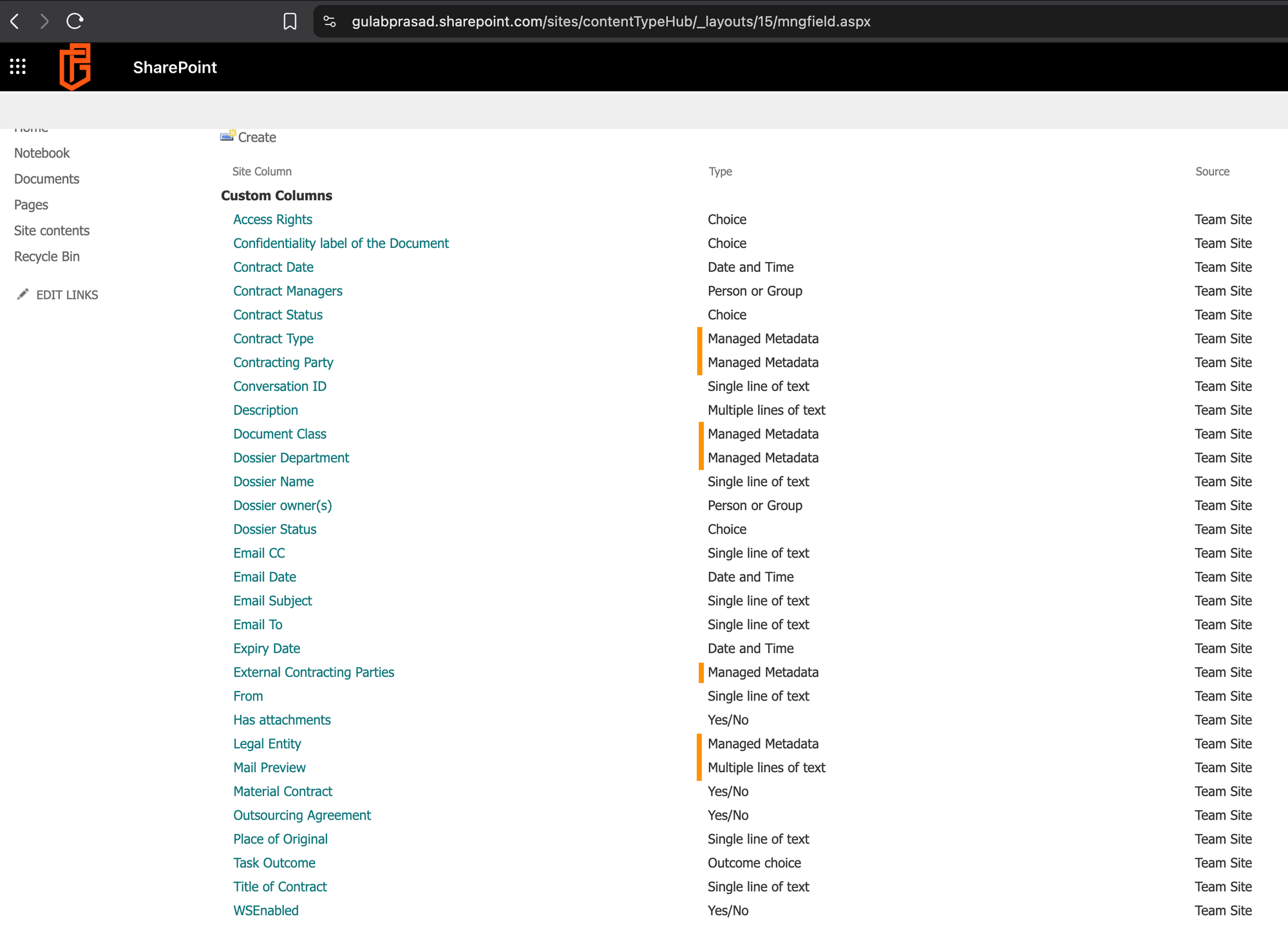
Phase 2 – Term Store & Taxonomy Columns
The 6 managed-metadata (taxonomy) columns depend on Term Store term sets that must exist first. This phase carries two of the most consequential findings in the whole deployment: a hidden retention-breaking bug (local vs global term sets) and a permission gotcha.
2.1 Term Store admin access — Global Admin is not enough
On first opening the Term Store, the DMS Terms group shows a view-only banner. Even a Global Administrator is not automatically a Term Store administrator — the Term Store has its own permission model.
2.2 Create the term sets
Create the DMS Terms group (under the Taxonomy root, so it is global), then add 6 term sets: Document Class, Contract Type, Contracting Party, Legal Entity, Dossier Department, External Contracting Parties.
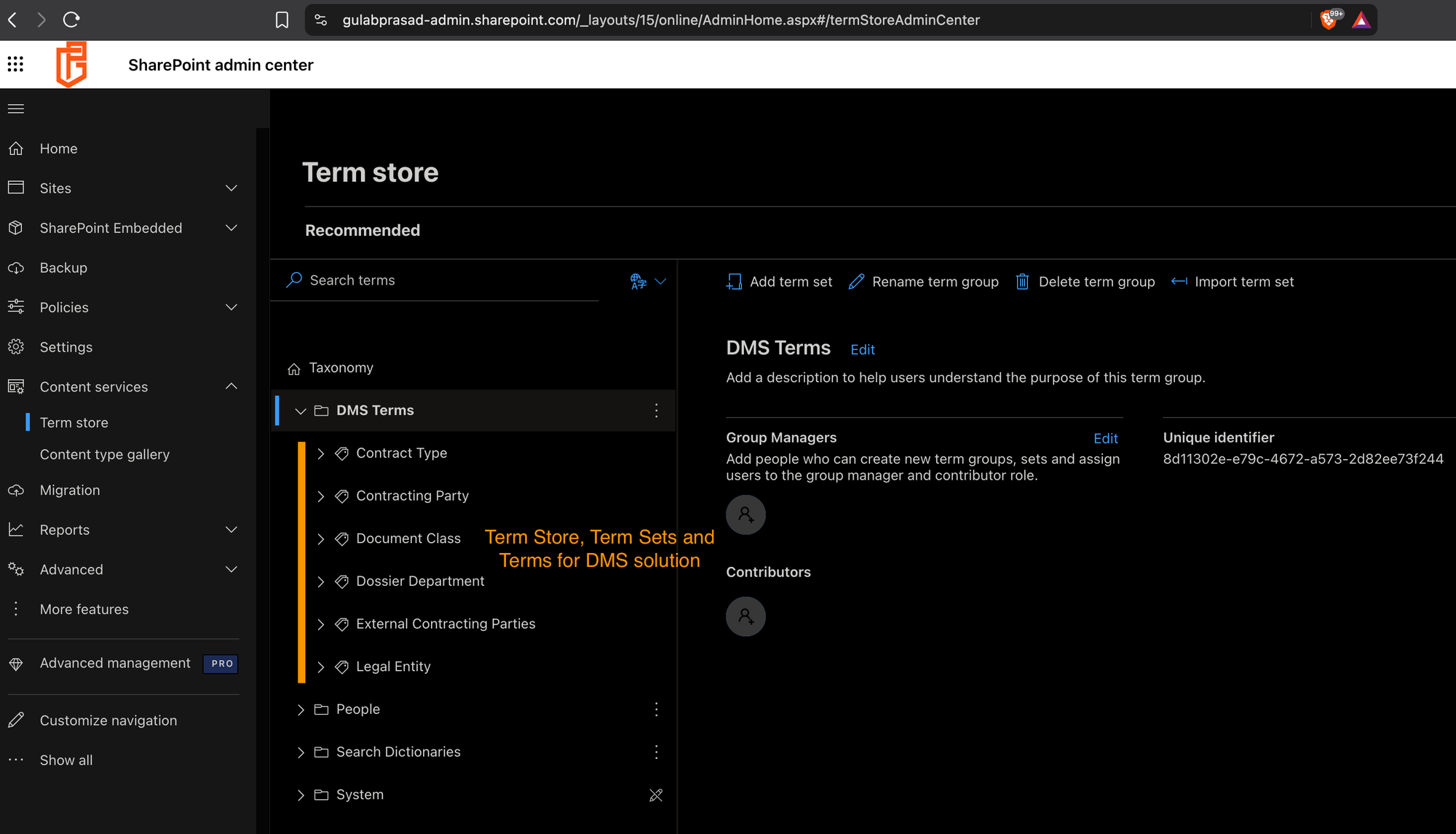
2.3 Document Class — the retention-critical term set
Document Class is the most important term set: its terms feed RefinableString09 in the retention KQL, so the term values must exactly match the KQL strings (case- and spelling-sensitive).
The 16 Document Class terms (must match KQL exactly):
| Feeds policy | Terms |
|---|---|
| Indefinite | Decision of supervisory authority; Documentation of decisions of the Board of Management; Decision of authority (except supervisory authority); Documentation of decisions of the Supervisory Board; Corporate Rule; Essential Product Documentation |
| 10-Year | Financial statement or report; Account book or list of assets; Documentation for accounting or bookkeeping; Business letter; Contractual document; Accounting record; Decision; Statutes or shareholders agreement or other corporate document |
| 5-Year | Documentation on anti-money laundering or economic sanctions |
| Business 10-Year | Retention for other business reasons |
2.4 Create the 6 taxonomy columns (UI)
Managed-metadata columns cannot be reliably created via Graph, so they are created in the UI (Content Type Hub → Site Columns → Create → Managed Metadata), each pointing at its DMS Terms term set.
2.5 "Customize your term set" vs "Use a managed term set" (critical)
This is the most dangerous trap in the deployment because it fails silently in two ways.
Lesson: When creating managed-metadata columns in the UI, always explicitly choose "Use a managed term set" and select the global term set. The UI can default to "Customize your term set", which silently creates an unpublishable, non-matching local set.
Phase 3 – Content Types
Six content types are created via Graph, split by parent: 3 file types inherit from Document (0x0101); 3 dossier types inherit from Document Set (0x0120D520).
Note — Dossiers must inherit from Document Set, not Document. The original script created all 6 content types from Document. A dossier that inherits from Document is a file and cannot contain other documents. Fix: the 3 dossier types must inherit from Document Set (0x0120D520); only the 3 file types inherit from Document (0x0101). Enable the Document Sets feature before creating the dossier types, or "Document Set" won't be an available parent.
# 3 file types - parent Document (0x0101)
$docTypes = @("Relevant Document","Email","Relevant Email")
foreach ($ctName in $docTypes) {
    $body = @{ name=$ctName; description="$ctName content type"; base=@{ id="0x0101" } } | ConvertTo-Json -Depth 10
    try {
        Invoke-MgGraphRequest -Method POST -Uri "https://graph.microsoft.com/v1.0/sites/$siteId/contentTypes" -Body $body -ContentType "application/json" -ErrorAction Stop
        Write-Host "Created (Document): $ctName" -ForegroundColor Green
    } catch { Write-Host "FAILED $ctName : $($_.ErrorDetails.Message)" -ForegroundColor Red }
}

# 3 dossier types - parent Document Set (0x0120D520)
$dossierTypes = @("Standard Dossier","Standard dossier with document class","Contract Dossier")
foreach ($ctName in $dossierTypes) {
    $body = @{ name=$ctName; description="$ctName content type"; base=@{ id="0x0120D520" } } | ConvertTo-Json -Depth 10
    try {
        Invoke-MgGraphRequest -Method POST -Uri "https://graph.microsoft.com/v1.0/sites/$siteId/contentTypes" -Body $body -ContentType "application/json" -ErrorAction Stop
        Write-Host "Created (Document Set): $ctName" -ForegroundColor Green
    } catch { Write-Host "FAILED $ctName : $($_.ErrorDetails.Message)" -ForegroundColor Red }
}
Note — Use explicit base IDs. Usebase=@{ id="0x0101" }andbase=@{ id="0x0120D520" }rather than base names; the name form is unreliable, and Document Set especially is safer by ID.
Phase 4 – Binding Columns to Content Types
4.1 The @odata.bind fix (a major, misleading error)
$allCTs  = (Invoke-MgGraphRequest -Method GET -Uri "https://graph.microsoft.com/v1.0/sites/$siteId/contentTypes").value
$allCols = (Invoke-MgGraphRequest -Method GET -Uri "https://graph.microsoft.com/v1.0/sites/$siteId/columns").value

$ctColumnMap = @{
    "Relevant Document" = @("DMS_Description","DMS_ConfidentialityLabel","Document_x0020_Class","DMS_PlaceOfOriginal","DMS_ExpiryDate")
    "Email" = @("DMS_EmailSubject","DMS_From","DMS_EmailTo","DMS_EmailCC","DMS_EmailDate","DMS_HasAttachments","DMS_MailPreview","DMS_ConversationID")
    "Relevant Email" = @("DMS_EmailSubject","DMS_From","DMS_EmailTo","DMS_EmailCC","DMS_EmailDate","DMS_HasAttachments","DMS_MailPreview","DMS_ConversationID","DMS_ConfidentialityLabel","Document_x0020_Class","DMS_ExpiryDate")
    "Standard Dossier" = @("DMS_DossierName","DMS_DossierStatus","DMS_DossierOwners","Dossier_x0020_Department","DMS_ConfidentialityLabel")
    "Standard dossier with document class" = @("DMS_DossierName","DMS_DossierStatus","DMS_DossierOwners","Dossier_x0020_Department","Document_x0020_Class","DMS_ConfidentialityLabel")
    "Contract Dossier" = @("DMS_ContractTitle","DMS_ContractStatus","DMS_ContractDate","Contract_x0020_Type","DMS_ContractManagers","DMS_MaterialContract","DMS_OutsourcingAgreement","Contracting_x0020_Party","Legal_x0020_Entity","External_x0020_Contracting_x0020_Parties","DMS_ExpiryDate","DMS_ConfidentialityLabel")
}

foreach ($ctName in $ctColumnMap.Keys) {
    $ct = $allCTs | Where-Object { $_.name -eq $ctName }
    if (-not $ct) { Write-Host "CT not found: $ctName" -ForegroundColor Red; continue }
    foreach ($colName in $ctColumnMap[$ctName]) {
        $sourceCol = $allCols | Where-Object { $_.name -eq $colName }
        if ($sourceCol) {
            # CORRECT: sourceColumn@odata.bind with the column URL
            $body = @{ "sourceColumn@odata.bind" = "https://graph.microsoft.com/v1.0/sites/$siteId/columns/$($sourceCol.id)" } | ConvertTo-Json
            try {
                Invoke-MgGraphRequest -Method POST -Uri "https://graph.microsoft.com/v1.0/sites/$siteId/contentTypes/$($ct.id)/columns" -Body $body -ContentType "application/json" -ErrorAction Stop
                Write-Host "Added $colName -> $ctName" -ForegroundColor Green
            } catch { Write-Host "$colName -> $ctName : $($_.ErrorDetails.Message)" -ForegroundColor Red }
        } else { Write-Host "Column not found: $colName" -ForegroundColor Yellow }
    }
}




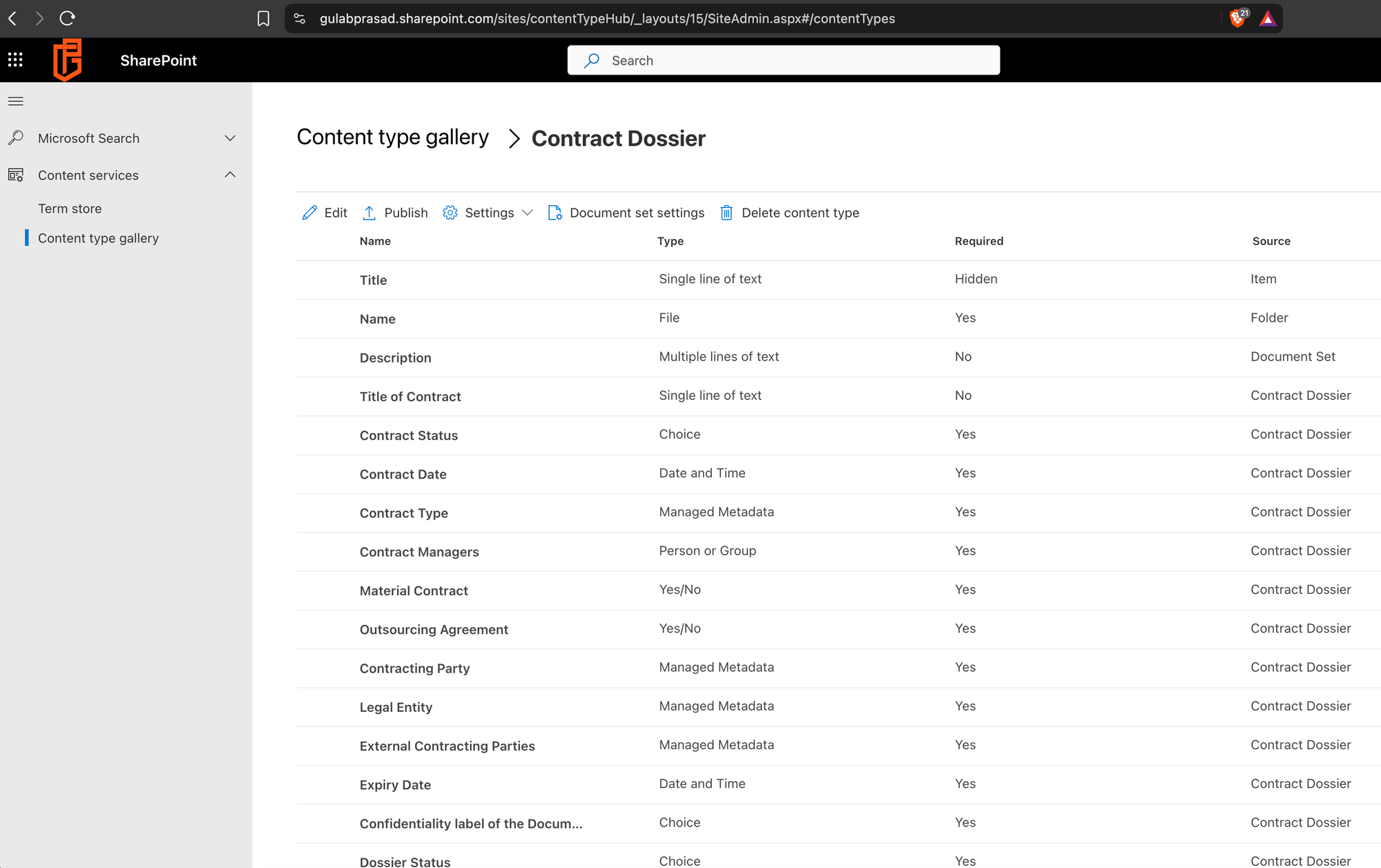
Phase 5 – Document Set Configuration
Document Set behaviors (allowed content types, shared columns) cannot be set via Graph — they are UI-only. This configuration is what makes dossier-driven retention work.
5.1 Allowed content types
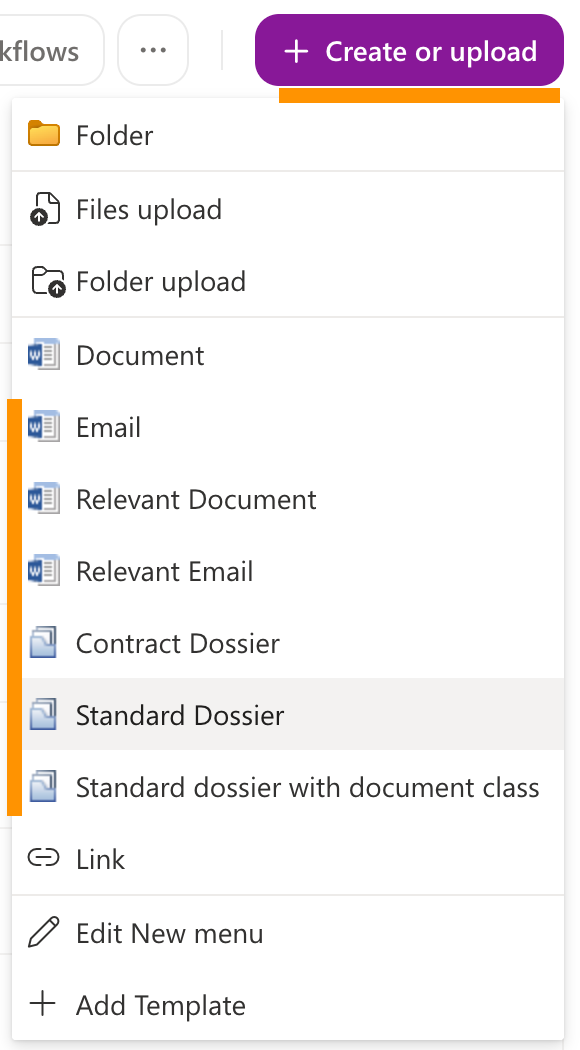
For each dossier, add the file/email types (Document, Email, Relevant Document, Relevant Email) so relevant documents can be archived inside the dossier.
5.2 Shared columns — the retention mechanism
Shared columns push the dossier's values down to every document inside it.
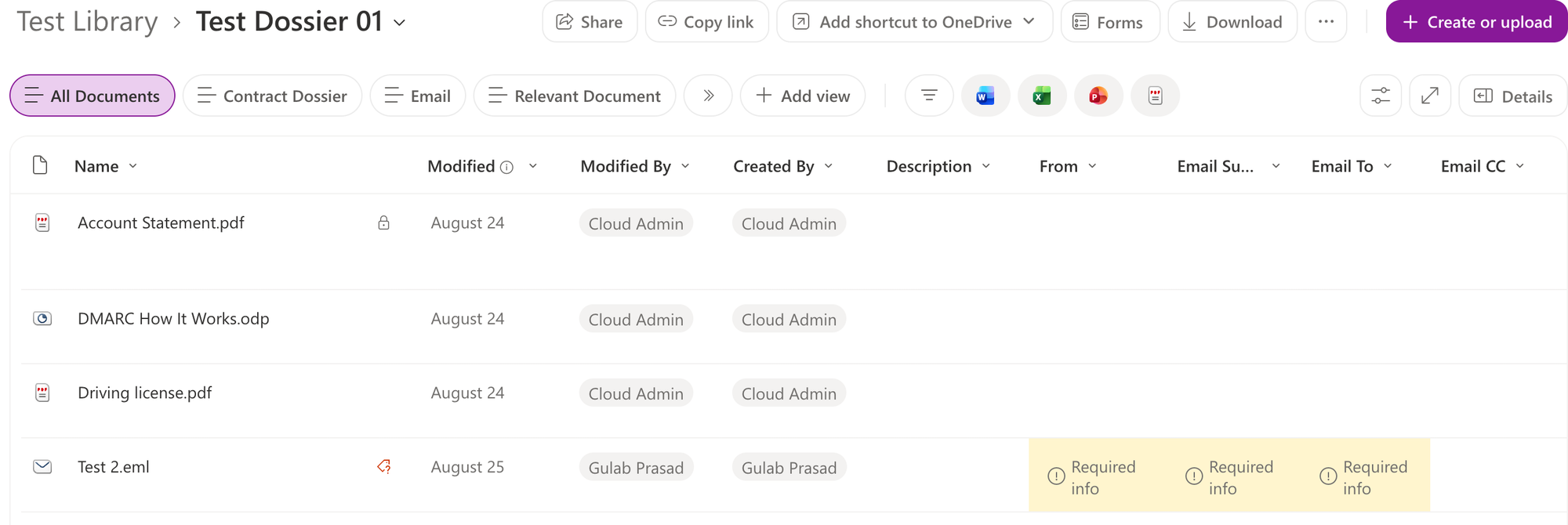
Note — Document Set shared columns are the retention linchpin. Dossier Status must be a shared column so that when the dossier owner closes the dossier, every contained document inherits "Closed" — which is what RefinableString12:("Closed") matches. Configured UI-only (Graph cannot set Document Set behaviors).5.3 Contract Dossier — the missing column
Note — Contract Dossier was missing Dossier Status. The binding map included Contract Status but not Dossier Status for Contract Dossier. Since retention triggers on Dossier Status = Closed for all dossiers, Contract Dossier could not satisfy the retention KQL. Fix: addDMS_DossierStatusto Contract Dossier (via Graph@odata.bind), then mark it shared. Lesson: verify the retention-trigger column exists on every container type. Confirmed design: retention triggers on Dossier Status = Closed regardless of Contract Status (which is separate contract-lifecycle metadata).

Phase 6 – Retention Labels & Policies
6.1 The architecture pivot — why auto-apply labels
The retention layer was initially built with adaptive scopes. This failed, and the failure drove the final architecture.
Note — Adaptive scopes cannot apply labels. Attaching a label to an adaptive-scope retention policy fails withParameter set cannot be resolved— for BOTH-PublishComplianceTagand-ApplyComplianceTag. Confirmed viaGet-Command New-RetentionComplianceRule -Syntax: the-AdaptiveScopeLocationand label parameters never appear in the same parameter set. They are mutually exclusive.
Resolution: Because the requirement is legal compliance AND retention/governance, and legal compliance needs formal record declaration (provided only by retention labels), the solution uses auto-apply label policies: the KQL moves from the adaptive scope into the rule's-ContentMatchQuery,-SharePointLocationprovides the location, and record labels deliver formal records. The adaptive scopes were deleted.
6.2 Create the retention labels
Six labels, with clean user-facing names (no "DMS" prefix, since labels are visible to end users). The three record labels provide formal record declaration for legal compliance.
Connect-IPPSSession

# Record labels (legal - formal record declaration)
New-ComplianceTag -Name "Record - Indefinite" -Comment "Retained permanently as a record; cannot be deleted." -RetentionAction Keep -RetentionType ModificationAgeInDays -RetentionDuration Unlimited -IsRecordLabel $true
New-ComplianceTag -Name "Record - 10 Years" -Comment "Retained as a record for 10 years from last modification." -RetentionAction Keep -RetentionType ModificationAgeInDays -RetentionDuration 3650 -IsRecordLabel $true
New-ComplianceTag -Name "Record - 5 Years" -Comment "AML/sanctions records; 5-year retention." -RetentionAction Keep -RetentionType ModificationAgeInDays -RetentionDuration 1825 -IsRecordLabel $true

# Non-record retention labels
New-ComplianceTag -Name "Business - 10 Years" -Comment "Business document retained 10 years." -RetentionAction Keep -RetentionType ModificationAgeInDays -RetentionDuration 3650 -IsRecordLabel $false
New-ComplianceTag -Name "Auto-Delete - 6 Years" -Comment "Non-relevant content deleted after 6 years." -RetentionAction Delete -RetentionType ModificationAgeInDays -RetentionDuration 2190 -IsRecordLabel $false
Note — Label creation gotchas.RetentionType="ModificationDate"is invalid — valid values areCreationAgeInDays,ModificationAgeInDays,TaggedAgeInDays,EventAgeInDays. Also, an Unlimited (indefinite) label needs BOTH-RetentionType ModificationAgeInDaysAND-RetentionDuration Unlimited— action-only or duration-only forms fail with a misleading "retention action is empty" error.
Note — Labels are user-facing; name them cleanly. Retention labels have no separate display-vs-internal name, so they were named "Record - 10 Years" (no "DMS" prefix) — a document owner wouldn't understand "DMS_". Policies keep the DMS_GP_ prefix since they are admin-only.
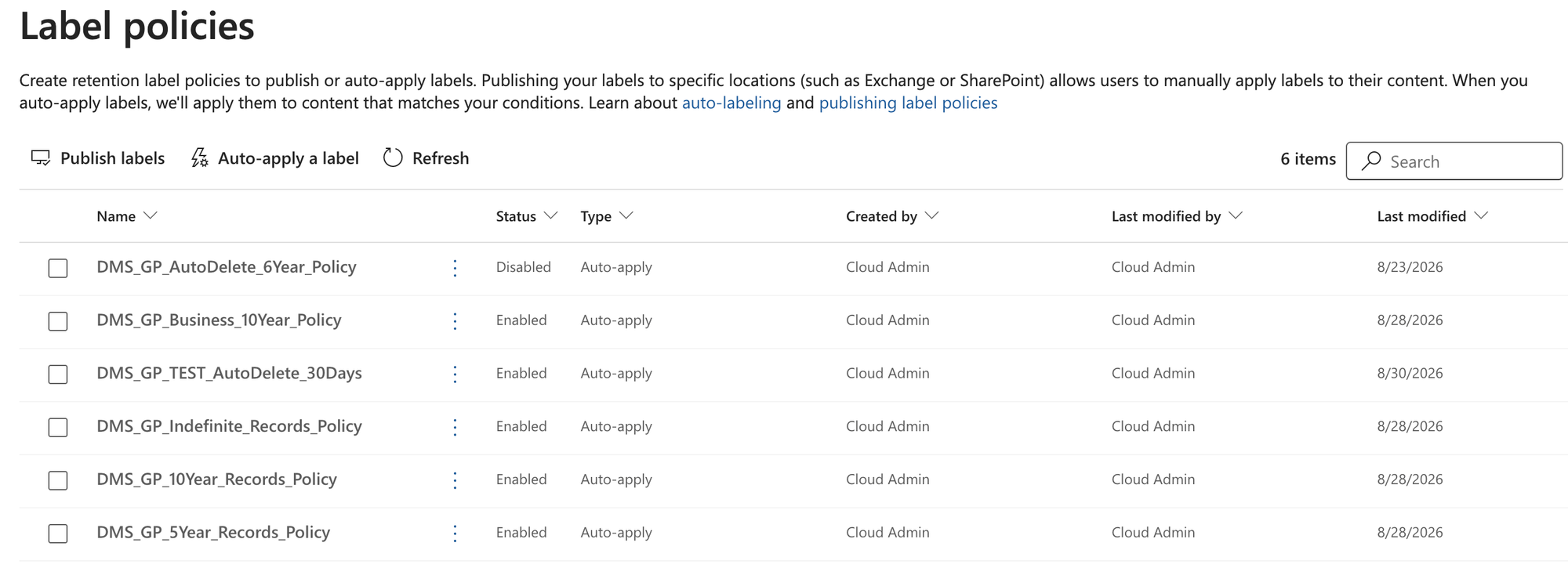
6.3 Create the auto-apply label policies
$testSite = "https://gulabprasad.sharepoint.com/sites/DMSSolutionTestSite"

$kql = @{
    Indefinite = 'RefinableString16:("Relevant document" OR "Relevant email") AND RefinableString12:("Closed") AND RefinableString09:("Decision of supervisory authority" OR "Documentation of decisions of the Board of Management" OR "Decision of authority (except supervisory authority)" OR "Documentation of decisions of the Supervisory Board" OR "Corporate Rule" OR "Essential Product Documentation")'
    TenYear    = 'RefinableString16:("Relevant document" OR "Relevant email") AND RefinableString12:("Closed") AND RefinableString09:("Financial statement or report" OR "Account book or list of assets" OR "Documentation for accounting or bookkeeping" OR "Business letter" OR "Contractual document" OR "Accounting record" OR "Decision" OR "Statutes or shareholders agreement or other corporate document")'
    FiveYear   = 'RefinableString16:("Relevant document" OR "Relevant email") AND RefinableString12:("Closed") AND RefinableString09:("Documentation on anti-money laundering or economic sanctions")'
    Business   = 'RefinableString16:("Relevant document" OR "Relevant email") AND RefinableString09:("Retention for other business reasons")'
    AutoDelete = 'RefinableString16:("Email" OR "Document") NOT RefinableString16:("Relevant document" OR "Relevant email")'
}

$policies = @(
    @{ Name="DMS_GP_Indefinite_Records_Policy"; Label="Record - Indefinite";  KQL=$kql.Indefinite },
    @{ Name="DMS_GP_10Year_Records_Policy";     Label="Record - 10 Years";    KQL=$kql.TenYear },
    @{ Name="DMS_GP_5Year_Records_Policy";      Label="Record - 5 Years";     KQL=$kql.FiveYear },
    @{ Name="DMS_GP_Business_10Year_Policy";    Label="Business - 10 Years";  KQL=$kql.Business },
    @{ Name="DMS_GP_AutoDelete_6Year_Policy";   Label="Auto-Delete - 6 Years"; KQL=$kql.AutoDelete }
)

foreach ($p in $policies) {
    try {
        New-RetentionCompliancePolicy -Name $p.Name -SharePointLocation $testSite -ErrorAction Stop | Out-Null
        # NOTE: NO -Name on the rule; -ApplyComplianceTag + -ContentMatchQuery
        New-RetentionComplianceRule -Policy $p.Name -ApplyComplianceTag $p.Label -ContentMatchQuery $p.KQL -ErrorAction Stop | Out-Null
        Start-Sleep -Seconds 120
        Set-RetentionCompliancePolicy -Identity $p.Name -Enabled $false -ErrorAction Stop | Out-Null
        Write-Host "Created + disabled: $($p.Name)" -ForegroundColor Green
    } catch { Write-Host "FAILED $($p.Name): $($_.Exception.Message)" -ForegroundColor Red }
}
Note — PolicyLockConflictException. Immediately after creation, the policy is mid-deployment and locked; Set-...-Enabled fails. Fix: wait ~1-2 minutes, then disable. Verify actual state with an audit — the inline messages can mislead.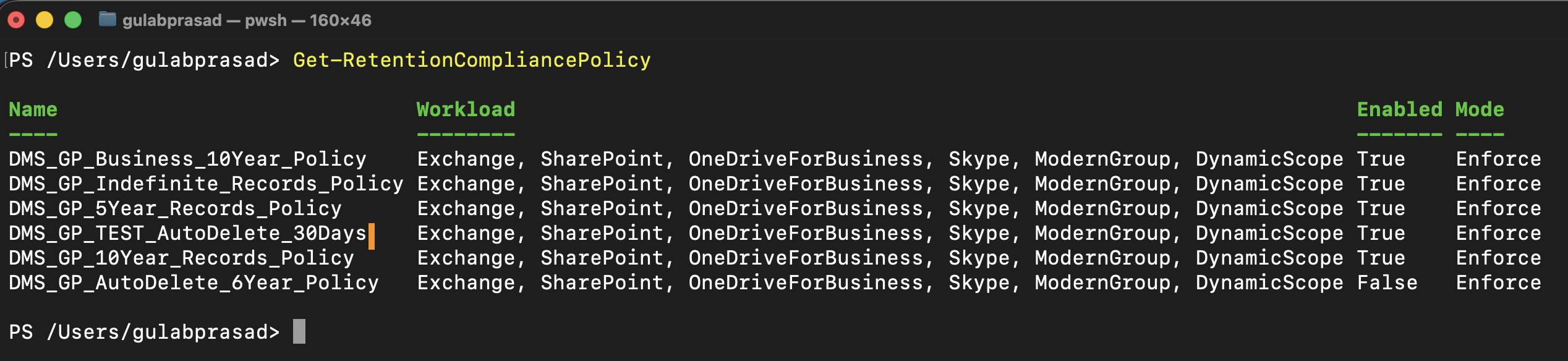

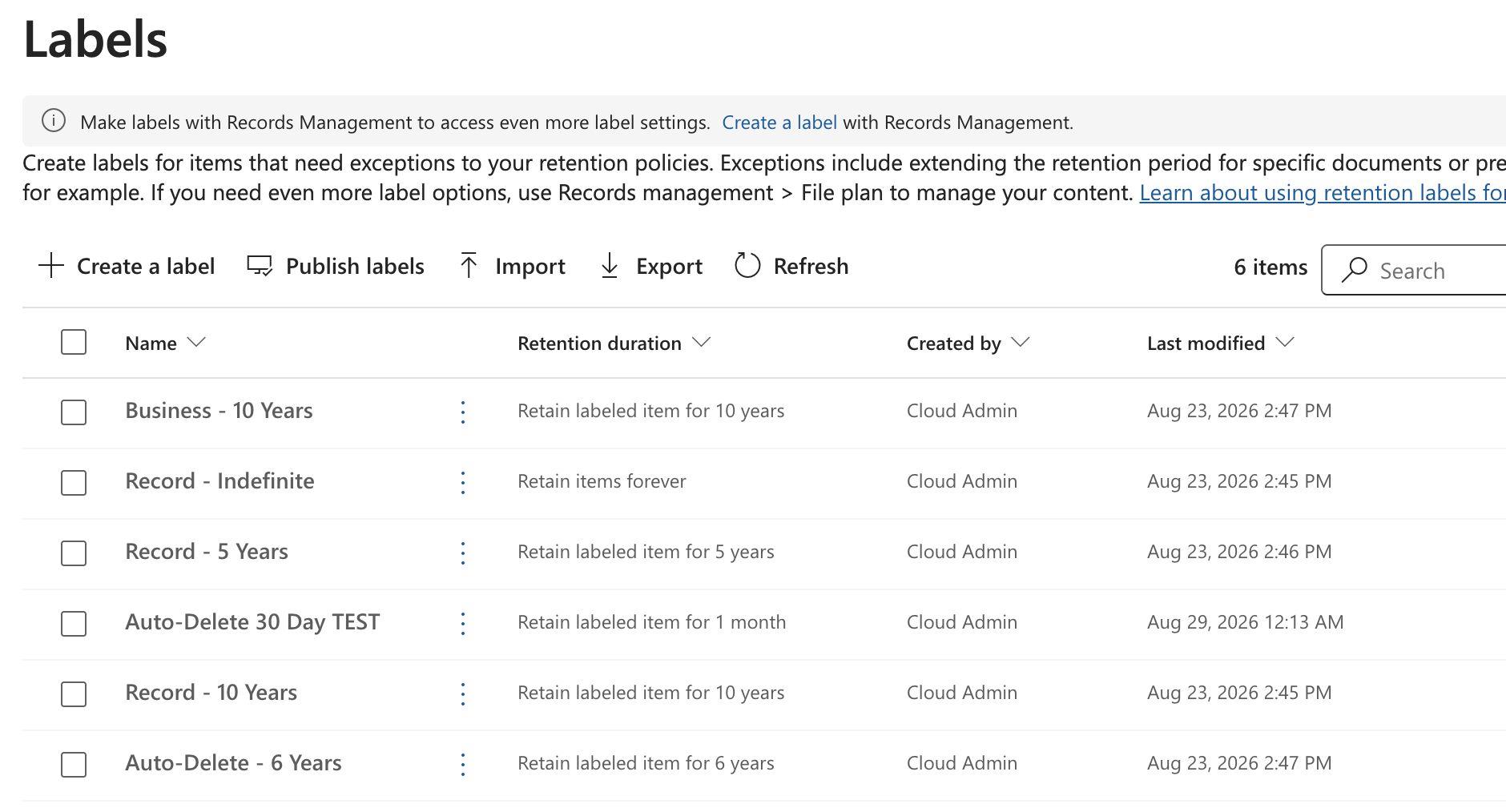
6.4 The 5 KQL queries (reference)
Metadata mapping: RefinableString16 = Content Type, RefinableString12 = Dossier Status, RefinableString09 = Document Class.
Indefinite Records (label: Record - Indefinite):
RefinableString16:("Relevant document" OR "Relevant email") AND RefinableString12:("Closed") AND RefinableString09:("Decision of supervisory authority" OR "Documentation of decisions of the Board of Management" OR "Decision of authority (except supervisory authority)" OR "Documentation of decisions of the Supervisory Board" OR "Corporate Rule" OR "Essential Product Documentation")
10-Year Records (label: Record - 10 Years):
RefinableString16:("Relevant document" OR "Relevant email") AND RefinableString12:("Closed") AND RefinableString09:("Financial statement or report" OR "Account book or list of assets" OR "Documentation for accounting or bookkeeping" OR "Business letter" OR "Contractual document" OR "Accounting record" OR "Decision" OR "Statutes or shareholders agreement or other corporate document")
5-Year Records (label: Record - 5 Years):
RefinableString16:("Relevant document" OR "Relevant email") AND RefinableString12:("Closed") AND RefinableString09:("Documentation on anti-money laundering or economic sanctions")
Business 10-Year (label: Business - 10 Years):
RefinableString16:("Relevant document" OR "Relevant email") AND RefinableString09:("Retention for other business reasons")
Auto-Delete 6-Year (label: Auto-Delete - 6 Years):
RefinableString16:("Email" OR "Document") NOT RefinableString16:("Relevant document" OR "Relevant email")
Note on AutoDelete: the KQL is content-only (identifies non-relevant content). The 6-year age is enforced by the label's duration (2190 days), not the query. The NOT clause protects relevant records from deletion.Phase 7 – Search Schema Mapping (The Gate)
The retention KQL uses RefinableString09/12/16, which must be mapped to crawled properties. Crawled properties only exist after content using those columns has been indexed — so this phase requires published content types, test content, and a crawl first.
7.1 Map the RefinableStrings
In SharePoint Admin → Search → Manage Search Schema → Managed Properties, map each RefinableString to exactly ONE crawled property:
| Managed Property | Crawled Property |
|---|---|
| RefinableString16 | ows_ContentType |
| RefinableString12 | ows_DMS_DossierStatus |
| RefinableString09 | ows_taxId_Document_x0020_Class |
Note — The gate. The crawled-property name derives from the column's internal name, so the UI-created taxonomy column's_x0020_encoding propagates here: Document Class →ows_taxId_Document_x0020_Class. Map to exactly one crawled property each; then reindex so the RefinableStrings populate. A wrong crawled-property name here = silent retention failure (the KQL matches nothing). This mapping is tenant-level — done once, applies everywhere. Crawled properties only appear after content bearing those columns has been crawled at least once, so the ordering is: publish content types → create test content → crawl → map → reindex.
8 – Validation
8.1 Create test content
A dossier is created, relevant documents filed inside with Document Class values, then the dossier is closed — and "Closed" propagates to the contained documents via the shared column. Verify each contained document shows Dossier Status = Closed.
8.2 Validate the KQL (before enabling policies)
Run the full retention KQL in SharePoint search to confirm it targets exactly the right content:
RefinableString16:("Relevant document" OR "Relevant email") AND RefinableString12:("Closed") AND RefinableString09:("Documentation on anti-money laundering or economic sanctions")
This should return exactly the one correctly-classified document.
Note — Validate with the full AND'd KQL, not single properties. Single-property queries in the classic search center show keyword-match noise (e.g. RefinableString12:"Closed" also returns unrelated documents containing the word "closed"). The full combined KQL that the policies actually use filters this out cleanly.8.3 The proof — the label auto-applied
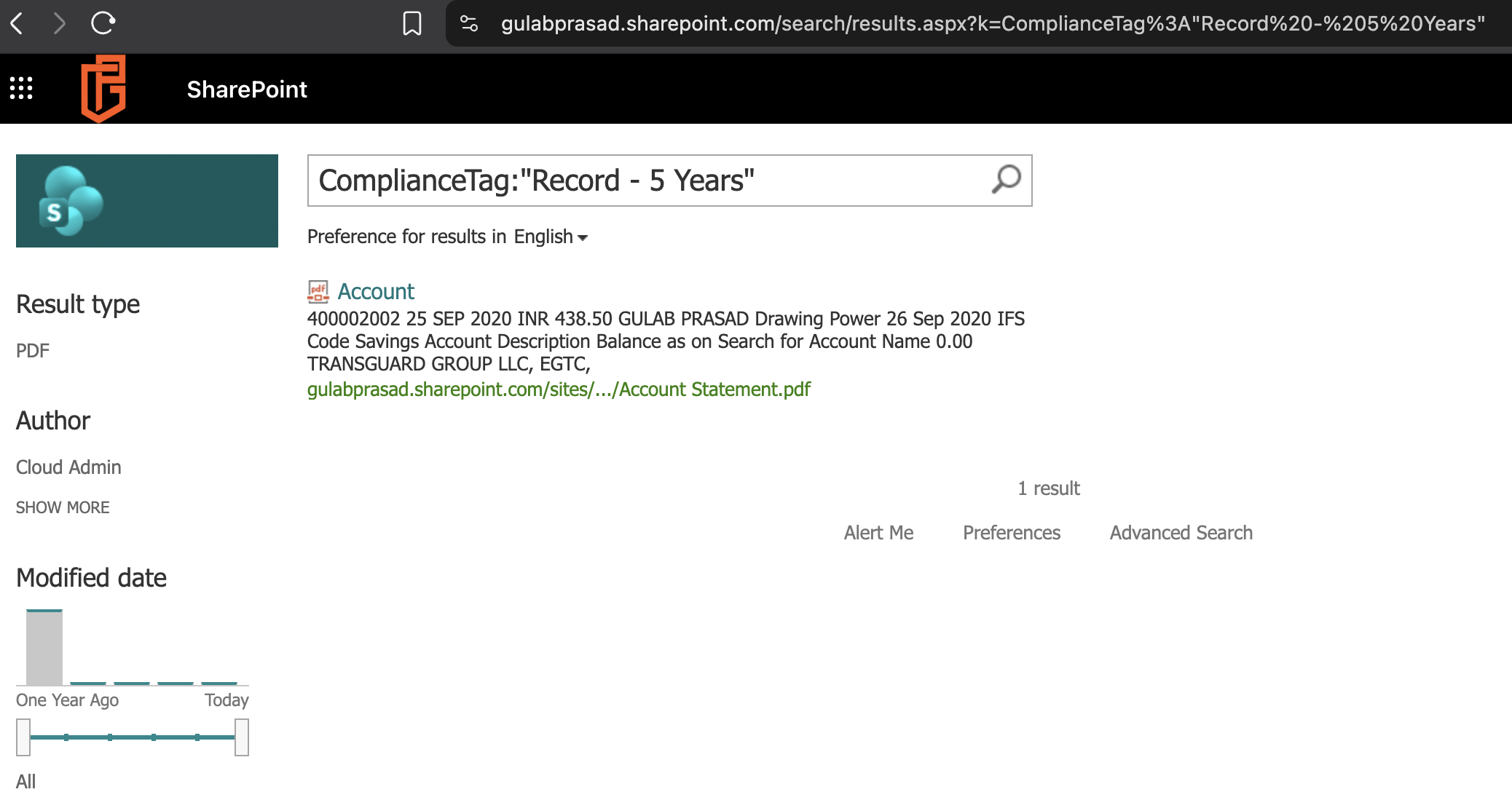
After enabling a policy, confirm the label was automatically applied and is searchable by ComplianceTag:
ComplianceTag:"Record - 5 Years"
This returns exactly the correctly-classified document, confirming the auto-apply policy stamped the visible retention label.
End-to-end validation successful. The complete pipeline is proven: content-type + taxonomy classification → Document Set shared-column status propagation → search crawl → RefinableString mapping → KQL content-match → auto-apply retention label. Distribution completes error-free; the label applies within ~1 day of enabling.
9 – Policy Operations & Verification
This section covers day-to-day operations: scoping policies to specific sites, enabling policies safely, and verifying that labels are actually applied.
9.1 Understanding Enable vs. Scope
Two independent controls govern where and whether a policy acts:
| Control | Command | Effect |
|---|---|---|
| Enable | Set-RetentionCompliancePolicy -Enabled $true/$false |
Global on/off switch for the entire policy |
| Scope | Set-RetentionCompliancePolicy -AddSharePointLocation / -RemoveSharePointLocation |
Defines which sites the policy acts on |
Key point: You cannot "enable a policy for one site and disable it for another." Enable is all-or-nothing for the whole policy. To make a policy act on only specific sites, scope it to those sites, then enable it. An enabled policy only touches its scoped locations.
Location rule: A policy scoped to "All" cannot also list individual sites — the two are mutually exclusive. To scope to specific sites, "All" must be removed first.
9.2 Check a Policy's Current State and Scope
Connect-IPPSSession

Get-RetentionCompliancePolicy -Identity "<PolicyName>" -DistributionDetail |
    Select-Object Name, Enabled, Mode, DistributionStatus, `
        @{N='Location';E={ $_.SharePointLocation.Name -join ', ' }}
DistributionStatus values: Pending (still deploying — labels won't apply yet), Success (deployed and evaluating).
Do not readSharePointLocationfrom a plainSelect-Objecttable column — it renders "All" as blank. Use-DistributionDetailand.SharePointLocation.Nameas above.
9.3 Scope a Policy to Specific Sites
To target specific sites rather than the whole tenant:
# Add one or more specific sites
Set-RetentionCompliancePolicy -Identity "<PolicyName>" `
    -AddSharePointLocation "https://gulabprasad.sharepoint.com/sites/Site1","https://gulabprasad.sharepoint.com/sites/Site2"

# Remove a specific site from scope
Set-RetentionCompliancePolicy -Identity "<PolicyName>" `
    -RemoveSharePointLocation "https://gulabprasad.sharepoint.com/sites/Site1"
To switch a policy from "All" to specific sites, remove "All" and add the sites in the same operation:
Set-RetentionCompliancePolicy -Identity "<PolicyName>" `
    -RemoveSharePointLocation "All" `
    -AddSharePointLocation "https://gulabprasad.sharepoint.com/sites/SpecificSite"
To switch from specific sites to "All", remove the individual site(s) and add "All" in the same operation:
Set-RetentionCompliancePolicy -Identity "<PolicyName>" `
    -AddSharePointLocation "All" `
    -RemoveSharePointLocation "https://gulabprasad.sharepoint.com/sites/SpecificSite"
9.4 Enable the Keep Policies
The four Keep (retain) policies are non-destructive and safe to enable tenant-wide:
$keepPolicies = @(
    "DMS_GP_Indefinite_Records_Policy",
    "DMS_GP_10Year_Records_Policy",
    "DMS_GP_5Year_Records_Policy",
    "DMS_GP_Business_10Year_Policy"
)
foreach ($p in $keepPolicies) {
    Set-RetentionCompliancePolicy -Identity $p -Enabled $true
    Write-Host "Enabled: $p" -ForegroundColor Green
}
9.5 Enabling the AutoDelete Policy (Destructive — Follow in Order)
The AutoDelete policy permanently deletes matching content. Deletion is irreversible. Complete these steps in order; do not skip the exclusion validation.
Step 1 — Validate the exclusion (mandatory).
Confirm that relevant records are excluded from the delete label. In SharePoint search, run:
ComplianceTag:"Auto-Delete - 6 Years"
The results must contain only non-relevant Documents/Emails — never a Relevant Document or Relevant Email. If any relevant record appears, stop: the exclusion (the NOT clause in the KQL) is not working, and the policy must not be enabled until fixed.
Step 2 — Set the scope deliberately.
Decide whether AutoDelete runs on specific sites (recommended for a destructive policy) or all sites:
# Specific site (controlled)
Set-RetentionCompliancePolicy -Identity "DMS_GP_AutoDelete_6Year_Policy" `
    -AddSharePointLocation "https://gulabprasad.sharepoint.com/sites/TargetSite"

# OR tenant-wide (only after full confidence)
Set-RetentionCompliancePolicy -Identity "DMS_GP_AutoDelete_6Year_Policy" `
    -AddSharePointLocation "All" `
    -RemoveSharePointLocation "https://gulabprasad.sharepoint.com/sites/DMSSolutionTestSite"
Step 3 — Enable.
Set-RetentionCompliancePolicy -Identity "DMS_GP_AutoDelete_6Year_Policy" -Enabled $true
Step 4 — Confirm.
Get-RetentionCompliancePolicy -Identity "DMS_GP_AutoDelete_6Year_Policy" -DistributionDetail |
    Select-Object Name, Enabled, DistributionStatus, @{N='Location';E={ $_.SharePointLocation.Name -join ', ' }}
Timing: Even once enabled, deletion is not immediate. Content must reach the retention age (6 years by modification date), then the deletion timer runs on its own cycle. Actual deletion can take weeks after eligibility.
9.6 Verifying That a Label Is Applied
The source of truth for whether a label is applied is search, not the library column (the column display can lag or cache).
In SharePoint search, query by the label name:
ComplianceTag:"Record - 5 Years"
ComplianceTag:"Record - 10 Years"
ComplianceTag:"Record - Indefinite"
ComplianceTag:"Business - 10 Years"
Each returns the documents that currently carry that label.
Tenant search URL:
https://gulabprasad.sharepoint.com/search
Blank "Retention label" column is normal when: (a) the document does not match any enabled policy's KQL, (b) the auto-apply evaluation cycle has not run yet (allow up to ~7 days after enabling), or (c) the column display is simply lagging the applied label. If theComplianceTag:"..."search returns the document, the label is applied regardless of the column display.
The "Sensitivity" column is unrelated to this solution — it is for sensitivity labels (Information Protection), which are not deployed here. It will always be blank.
9.7 Full Policy & Label Audit
Connect-IPPSSession

Write-Host "=== Policies ===" -ForegroundColor Cyan
Get-RetentionCompliancePolicy | Where-Object { $_.Name -like "DMS_GP_*" } |
    Select-Object Name, Enabled | Format-Table -AutoSize

Write-Host "=== Policy scope + rule label ===" -ForegroundColor Cyan
foreach ($p in (Get-RetentionCompliancePolicy | Where-Object { $_.Name -like "DMS_GP_*" }).Name) {
    $pol  = Get-RetentionCompliancePolicy -Identity $p -DistributionDetail
    $rule = Get-RetentionComplianceRule -Policy $p
    $tag  = Get-ComplianceTag | Where-Object { $_.Guid -eq $rule.ApplyComplianceTag }
    Write-Host "$p | Enabled: $($pol.Enabled) | Location: $($pol.SharePointLocation.Name -join ', ') | Label: $($tag.Name)"
}

Write-Host "=== Labels ===" -ForegroundColor Cyan
Get-ComplianceTag | Where-Object { $_.Name -like "Record*" -or $_.Name -like "Business*" -or $_.Name -like "Auto-Delete*" } |
    Select-Object Name, RetentionAction, RetentionDuration, IsRecordLabel | Format-Table -AutoSize
Phase 10 – Email Filing Integration (Harmon.ie)
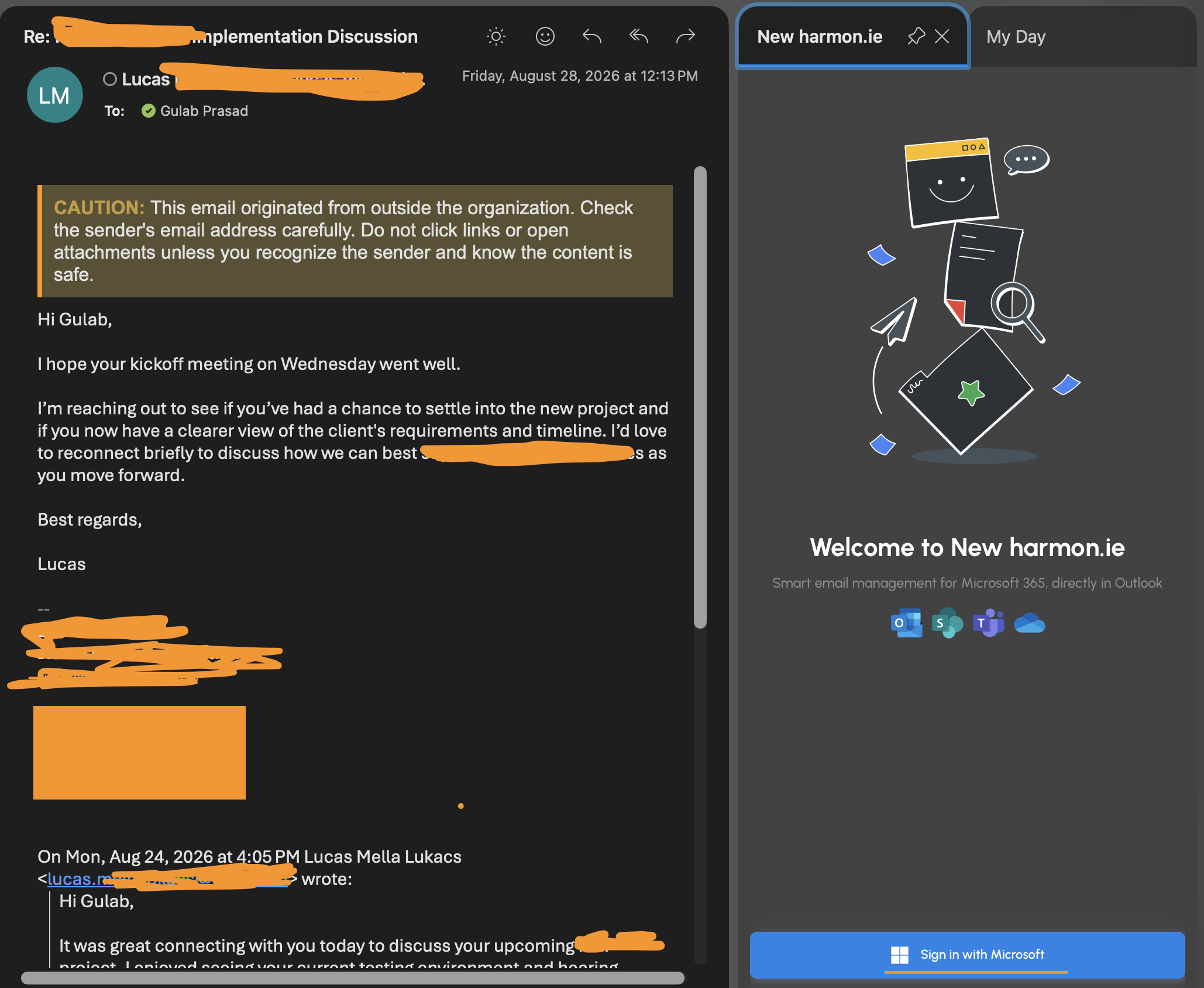
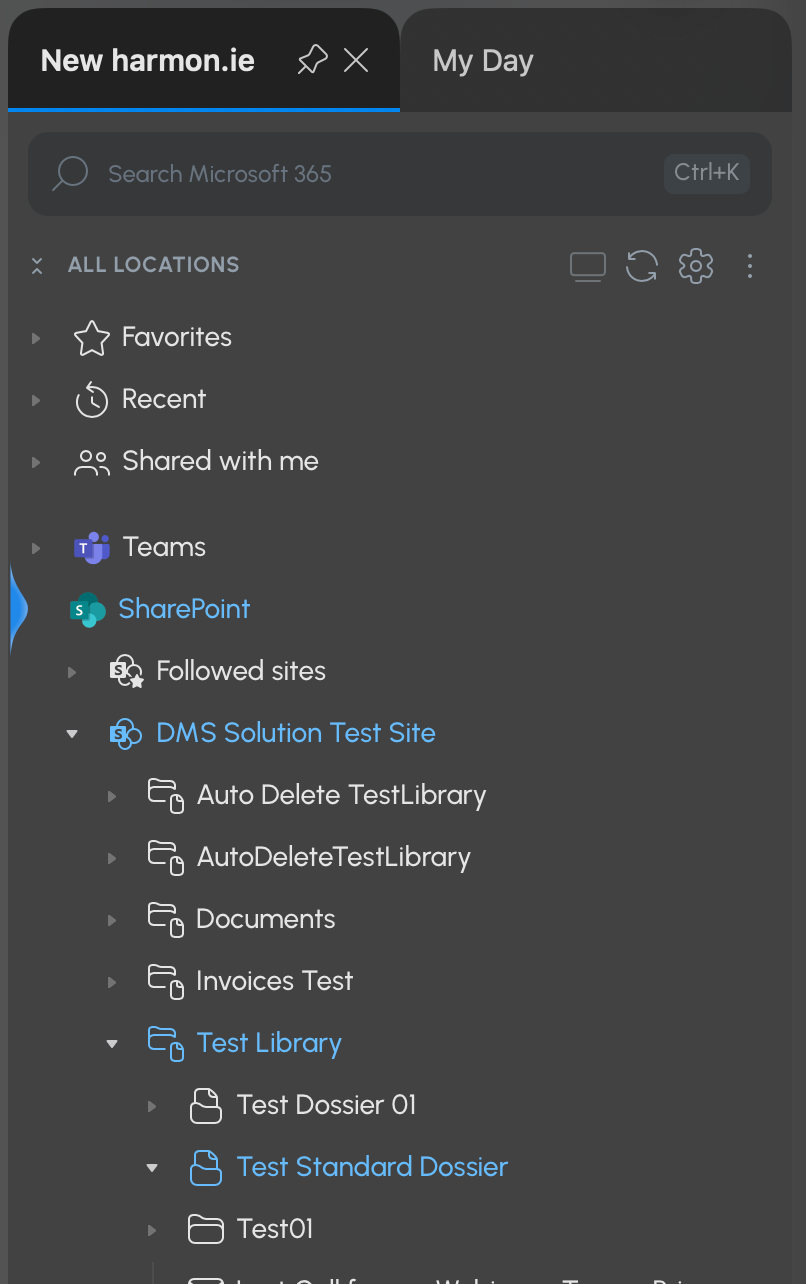
Harmon.ie is the tool that lets users file emails and documents from Outlook into SharePoint dossiers, mapping email properties to DMS columns. This phase describes how it fits the solution and how to configure it so filing works reliably and every filed item is retention-classified.
Note: Harmon.ie is a filing/user-experience layer. The DMS retention engine (content types, dossiers, labels, KQL) works independently of it. Harmon.ie controls how content enters SharePoint with metadata — it is not part of the retention mechanism itself.
10.1 Harmon.ie's role in the DMS
- Files emails from Outlook directly into a dossier (Document Set) in the target library.
- Sets the item's content type (Email or Relevant Email) during filing.
- Auto-populates the email metadata columns from the email itself: Email Subject, From, Email To, Email CC, Email Date, Has attachments, Conversation ID.
- Prompts the user for classification columns (Document Class, Confidentiality) where configured.
10.2 Column mapping
Columns fall into two groups for Harmon.ie configuration:
| Group | Columns | How Harmon.ie handles them |
|---|---|---|
| Auto-mapped from the email | Email Subject, From, Email To, Email CC, Email Date, Has attachments, Conversation ID | Read directly from the email; no user input needed |
| User classification (prompted) | Document Class, Confidentiality label of the Document, (and dossier context) | Presented as pickers in the filing dialog; user selects |
Conversation ID is captured automatically from the email's thread identifier. Without a filing tool it remains blank; once Harmon.ie is integrated it populates on every filed email, enabling thread grouping within a dossier.
 Maya Bickson
10.3 Required-column alignment (critical)
A column that is required in SharePoint but is not mapped or prompted in Harmon.ie will cause filing to fail — Harmon.ie cannot satisfy the required field, and the save is blocked.
Therefore, SharePoint required columns and Harmon.ie configuration must be co-designed:
- Auto-mapped email columns may be required in SharePoint — Harmon.ie fills them, so filing succeeds.
- Classification columns should be required in SharePoint only if Harmon.ie is configured to prompt for them as mandatory at filing time. Otherwise, make them optional to avoid filing failures.
In this deployment, only Document Class is required (all other DMS columns are optional). This is a deliberate, filing-friendly posture: it minimizes the risk of Harmon.ie filing failures while still enforcing the one field retention depends on.
10.4 Enforce Document Class at filing time
Document Class drives retention classification (RefinableString09). An email filed without a Document Class will not match any records-retention KQL and will fall outside retention.
Recommended configuration:
- Keep Document Class required in SharePoint.
- Configure Harmon.ie to present Document Class as a mandatory picker in the filing dialog, sourced from the DMS Terms → Document Class term set.
This enforces classification at both layers: the user must choose a Document Class to complete filing, Harmon.ie writes it, and retention can then classify the email correctly.
10.5 Dossier filing and the retention trigger
- Users file relevant emails into a dossier (not the library root). The dossier's shared columns (Dossier Status, Confidentiality) propagate to the filed email.
- Retention triggers when the dossier owner closes the dossier (Dossier Status = Closed) — the same mechanism as for documents. A filed email in a closed dossier, classified with a Document Class, matches the records-retention KQL and receives its label automatically.
10.6 Pre-rollout test checklist
Before rolling Harmon.ie out to users, file a test email into a test dossier and confirm:
- [ ] The email files successfully with no blocked required fields.
- [ ] Content type is set correctly (Email or Relevant Email).
- [ ] Email metadata columns are auto-populated (Subject, From, To, Date, Conversation ID).
- [ ] Document Class is prompted and, when selected, written to the item.
- [ ] The filed email inherits the dossier's shared column values (e.g. Confidentiality; Dossier Status once the dossier is closed).
- [ ] After closing the dossier and allowing crawl + evaluation, the filed email receives the correct retention label (verify via
ComplianceTag:"<label>"search).
10.7 Summary
| Aspect | Configuration |
|---|---|
| Email metadata columns | Auto-mapped by Harmon.ie; safe as required |
| Document Class | Required in SharePoint + mandatory prompt in Harmon.ie |
| Other classification columns | Required only if prompted; otherwise optional |
| Conversation ID | Auto-populated by Harmon.ie (thread grouping) |
| Filing target | Into a dossier, not the library root |
| Retention trigger | Dossier owner closes the dossier (Dossier Status = Closed) |
Phase 11 – Production Cutover
Once validated, the four Keep policies are widened from the test site to all sites (current and future). AutoDelete is held back until its exclusion is validated on disposable content.
Connect-IPPSSession

$keepPolicies = @(
    "DMS_GP_Indefinite_Records_Policy",
    "DMS_GP_10Year_Records_Policy",
    "DMS_GP_5Year_Records_Policy",
    "DMS_GP_Business_10Year_Policy"
)

foreach ($p in $keepPolicies) {
    Set-RetentionCompliancePolicy -Identity $p `
        -AddSharePointLocation "All" `
        -RemoveSharePointLocation "https://gulabprasad.sharepoint.com/sites/DMSSolutionTestSite"
    Write-Host "Widened to All sites: $p" -ForegroundColor Green
}
Note — "All" cannot combine with individual locations. Adding "All" while an individual site is still bound fails with BindingCannotCombineAllWithIndividualBindingsException. Fix: remove the individual site in the same command as adding "All". "All" must be the sole SharePoint location, and it automatically covers future sites.Note —SharePointLocationshows blank in tables. ASelect-Objectcalculated column renders "All" as empty. Fix: verify withGet-RetentionCompliancePolicy -Identity <p> -DistributionDetailand read$pol.SharePointLocation.Name.
AutoDelete stays disabled and test-scoped until its exclusion (relevant records NOT deleted) is validated. The retention policies at "All" only label content matching the KQL — random content is untouched because it doesn't carry the DMS content types.
Phase 1 – Per-Site Onboarding Runbook
Key architectural insight: Retention (policies at "All" + tenant-level search mapping) is already active on every site, including pre-existing ones. Sites only need onboarding so users can create DMS content — not for retention to function. Onboard sites as they adopt the DMS.
Step 1 — Activate Content Type Subscriber (scriptable):
Connect-SPOService -Url "https://gulabprasad-admin.sharepoint.com"
$design = Get-SPOSiteDesign | Where-Object { $_.Title -eq "DMS Features" }
Invoke-SPOSiteDesign -Identity $design.Id -WebUrl "https://gulabprasad.sharepoint.com/sites/<SITENAME>"
(The design's Document Sets action reports "Failure" — expected; only CT Subscriber matters here.)
Step 2 — Wait for content-type propagation (hours; verify with Get-PnPContentType).
Step 3 — Activate Document Sets (MANUAL — UI only):
Go to https://gulabprasad.sharepoint.com/sites/<SITENAME>/_layouts/15/ManageFeatures.aspx?Scope=Site → Document Sets → Activate.
Step 4 — Add DMS content types to the target library (file types via "+ Add column → Content type"; dossier types via classic library settings "Add from existing site content types").
Step 5 — Verify dossier creation works (use the classic New menu; the modern New menu does not always list Document Set types).
Note — Document Sets can't be activated by API. Neither site design (activateSPFeature) norEnable-PnPFeaturecan activate Document Sets in SPO — both fail "Feature ... is not installed in this farm, and cannot be added to this scope," even on a site where it is already active. Only the UI (ManageFeatures.aspx) — or an approved own-tenant PnP app — activates it. This is the single non-scriptable per-site step.
Note — Document Sets feature is required per receiving site. Content Type Subscriber (73EF14B1) lets a site receive published content types (file types propagate with just this). But Document Set content types are silently skipped unless the Document Sets feature (3BFFD08F) is also active on that site. Symptom: file types appear on the target library but dossiers don't.
PnP option for Document Sets (for when approved)
$ClientId="<CLIENT_ID>"; $Tenant="gulabprasad.onmicrosoft.com"; $Thumbprint="<THUMBPRINT>"
$DocSetFeature="3BFFD08F-6F9B-4853-8395-2853C8AA6DED"

Connect-PnPOnline -Url "https://gulabprasad-admin.sharepoint.com" -ClientId $ClientId -Tenant $Tenant -Thumbprint $Thumbprint
$sites = Get-PnPTenantSite | Where-Object { $_.Url -notlike "*-my.sharepoint.com*" -and $_.Template -notlike "SPSPERS*" }

foreach ($site in $sites) {
    try {
        Connect-PnPOnline -Url $site.Url -ClientId $ClientId -Tenant $Tenant -Thumbprint $Thumbprint -ErrorAction Stop
        Enable-PnPFeature -Identity $DocSetFeature -Scope Site -Force -ErrorAction Stop
        Write-Host "Activated: $($site.Url)" -ForegroundColor Green
    } catch { Write-Host "ERROR $($site.Url): $($_.Exception.Message)" -ForegroundColor Red }
}
Note — PnP tenant ops need the SharePoint API app permission.Get-PnPTenantSitefailsUnauthorizedunless the app has SharePoint → Sites.FullControl.All (Application, admin-consented) — a separate grant from Graph's Sites.FullControl.All. Consent propagation takes several minutes; disconnect/reconnect for a fresh token.
Note: In this tenant, even with the correct permission,Enable-PnPFeaturefor Document Sets still failed the same way as the site design — confirming Document Sets activation in SPO is genuinely UI-only in most cases. Test the PnP route in your own tenant before relying on it.
12. Troubleshooting Log (Complete)
| # | Issue | Cause | Fix |
|---|---|---|---|
| 1 | Column create: generic BadRequest | Empty $siteId → /sites//columns |
Fetch site + assign $siteId same session; guard for empty |
| 2 | Real error hidden | $_.Exception.Message too generic |
Use $_.ErrorDetails.Message |
| 3 | "Column name was not provided" | name (internal name) is mandatory |
Include name="DMS_X" per column |
| 4 | Columns land in "Custom Columns" | Graph silently ignores group |
Accept it (cosmetic); PnP-free = no scripted fix |
| 5 | Text column create fails | Missing textType |
Add textType="plain" |
| 6 | Term Store view-only | Global Admin ≠ Term Store admin | Add self at Taxonomy node → Term store administrators |
| 7 | Retention never matches | Term "Decision" uppercase vs KQL lowercase | Keep term store ↔ KQL exact-match |
| 7b | Encoded internal names | UI-created taxonomy cols get _x0020_ |
Reference Document_x0020_Class etc. in bindings & mapping |
| 8 | Dossier can't hold documents | Inherited Document, not Document Set | Dossiers inherit 0x0120D520; enable Document Sets first |
| 9 | Content-type base errors | Base by name unreliable | Use explicit base IDs |
| 10 | "sourceColumn not present" (all CTs) | Wrong body: sourceColumn:{id} |
Use sourceColumn@odata.bind with column URL |
| 11 | Retention needs shared status | Document Set shared columns | Share Dossier Status (UI-only) |
| 12 | Contract Dossier can't match retention | Missing Dossier Status column | Add via @odata.bind, then share |
| 13 | Label create fails | ModificationDate invalid; Unlimited needs type+duration |
Use ModificationAgeInDays; Unlimited = type + RetentionDuration Unlimited |
| 14 | AdaptiveScope LocationType error | Used Sites |
Use singular Site |
| 15 | Policy create + Enabled fails | Different parameter sets | Create, then Set-...-Enabled $false separately |
| 16 | First cmdlet transient cast error | Session warm-up | Retry |
| 17 | Adaptive scope + label impossible | Mutually exclusive parameter sets | Auto-apply label policies; KQL in -ContentMatchQuery; delete scopes |
| 18 | Auto-apply rule "parameter set" error | -Name not allowed with -ApplyComplianceTag |
Omit -Name; diagnose with -Syntax |
| 19 | PolicyLockConflictException | Policy mid-deployment | Wait ~2 min, then modify |
| 20 | Labels show "DMS_" to users | Labels are user-facing | Clean label names; keep DMS_GP_ on policies |
| 21 | Publish fails + silent retention break | Columns used local "Customize your term set" | Re-point to global "Use a managed term set" |
| 22 | Dossiers don't propagate to a site | Document Sets feature not active on receiving site | Activate Document Sets per site (UI) |
| 23 | Dossiers missing from New menu | Modern New menu limited for Document Sets | Use classic New menu |
| 24 | Can't complete dossier form | Empty term sets (required cols) | Populate all term sets, not just Document Class |
| 25 | "You need access" to site | Global Admin ≠ site content access | Add self as site owner via admin center |
| 26 | KQL matches nothing | Crawled properties don't exist until crawled; must map + reindex | Publish → test content → crawl → map RefinableString09/12/16 → reindex |
| 27 | "All" + individual locations error | Can't combine | Remove individual site in same command as adding "All" |
| 28 | SharePointLocation blank in table |
Calculated-column rendering | Use -DistributionDetail + .SharePointLocation.Name |
| 29 | Get-PnPTenantSite Unauthorized |
Missing SharePoint API app permission | Grant SharePoint → Sites.FullControl.All (separate from Graph); reconnect |
| 30 | Document Sets won't activate by API | SPO blocks feature-activation API for this feature | UI (ManageFeatures.aspx) or approved own-tenant PnP app |
Appendix A – Why PnP-Free (Summary)
| Task | Tool used | PnP needed? |
|---|---|---|
| Site columns | Microsoft Graph | No |
| Content types | Microsoft Graph | No |
| Column binding | Microsoft Graph (@odata.bind) |
No |
| Term Store | Admin UI | No |
| Document Set config | Admin UI | No (Graph can't; UI only) |
| Retention labels/policies | ExchangeOnlineManagement | No |
| Search mapping | Admin UI | No |
| CT Subscriber feature | SPO Mgmt Shell (site design) | No |
| Document Sets feature | Admin UI | UI-only, or approved own-tenant PnP |
| Tenant feature rollout | SPO Mgmt Shell + UI | Optional PnP (own app) |
Conclusion: A fully PnP-free deployment is achievable using Graph + ExchangeOnlineManagement + SPO Management Shell + the admin UI. The only genuine gap is Document Sets feature activation, which is UI-only in SharePoint Online regardless of tooling — the one place an approved own-tenant PnP app helps at scale.